 Chat with all AI
Switch between GPT-6.1, Claude, Muse and Grok in one tap
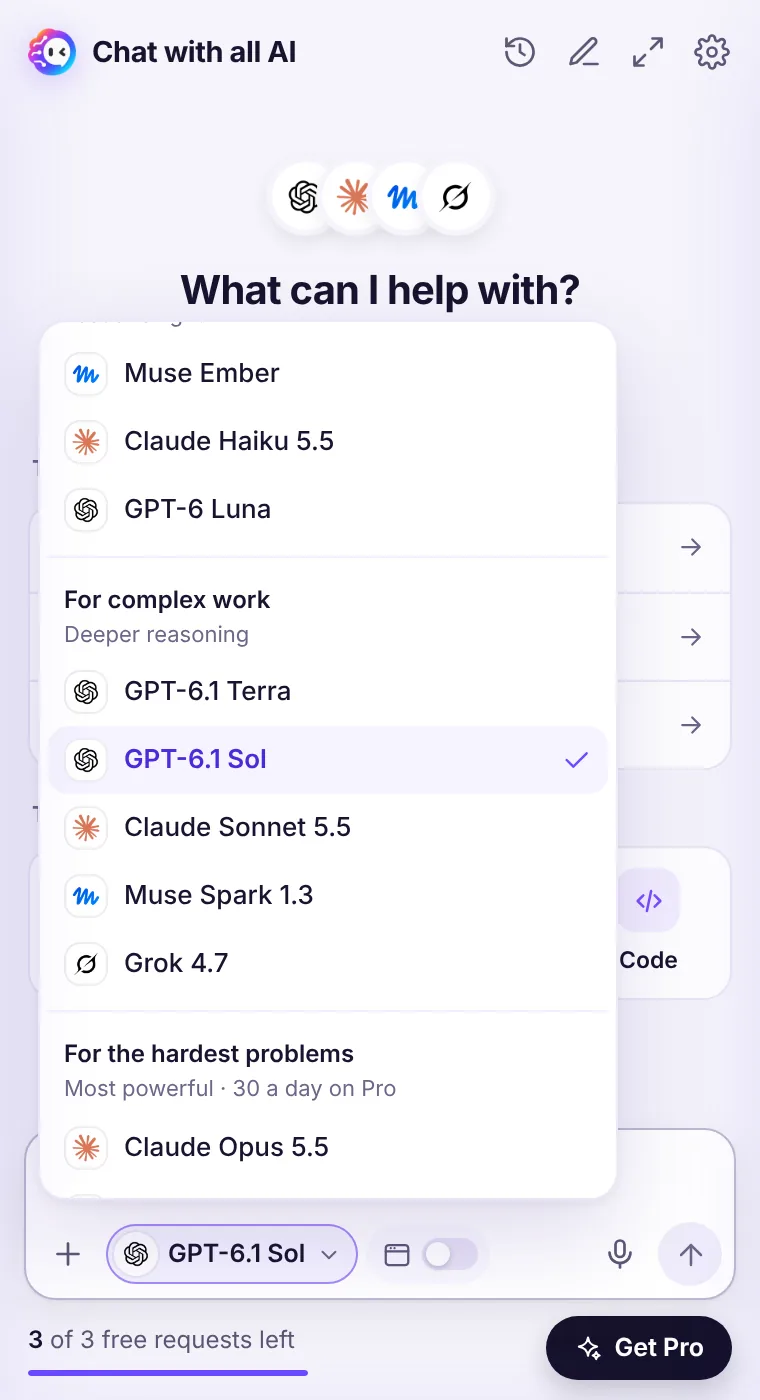
The model menu sits right in the message box. It groups 11 models by what they're good at, so choosing the right one takes a second — and every answer is labelled with the model that wrote it.
How it works
- Click the model name in the message box (it shows the logo of the current model).
- Pick a model from one of three groups: For everyday tasks, For complex work or For the hardest problems.
- Ask your question. The answer is labelled with the model's logo and name, so you always know who answered.
- Not happy? Switch the model and press Regenerate to compare.
Why switching models matters
No single model is best at everything. Claude often writes the most natural prose, GPT-6.1 is great at structured, step-by-step answers, Muse is quick and friendly, and Grok gives blunt, direct takes. When the models sit in one menu, comparing them stops being a chore — you can ask the same question twice and keep the better answer.The three groups
Everyday — Muse Ember, Claude Haiku 5.5 and GPT-6 Luna: fast and light. Complex work — GPT-6.1 Terra, GPT-6.1 Sol, Claude Sonnet 5.5, Muse Spark 1.3 and Grok 4.7: deeper reasoning. Hardest problems — Claude Opus 5.5, Claude Fable 5.2 and Muse Wonder: the most powerful models, with 30 requests a day included in Pro.See it in the extension
Frequently asked questions
Can I set a default model?
Yes. The model you pick stays selected for your next questions until you change it.
Do free requests work with every model?
Yes. Your 3 free requests work with any model, including Claude Opus 5.5 and Muse Wonder.
Every top AI model, one side panel
Try GPT-6.1, Claude, Muse and Grok free — 3 requests, no card needed.