 Chat with all AI
Create images from a description, right in your browser
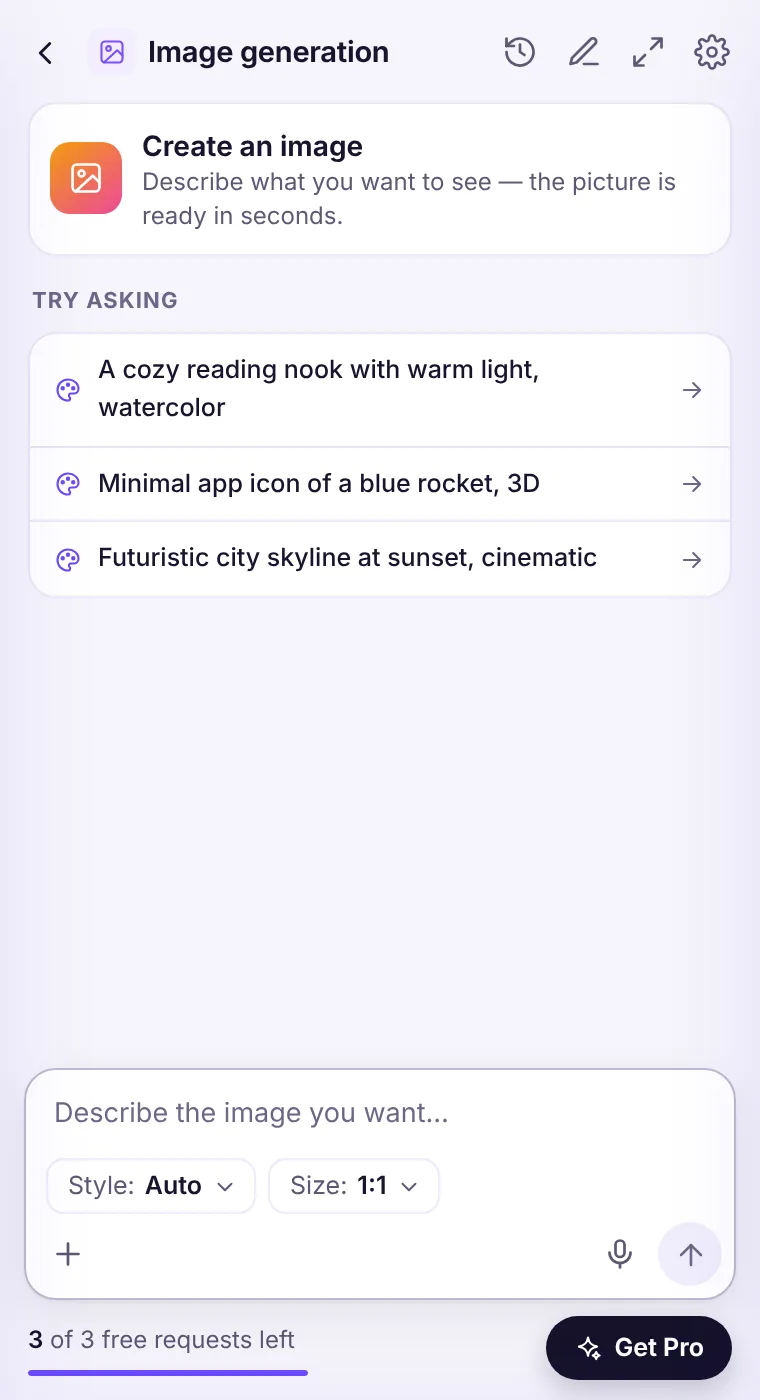
Switch to Image mode, describe what you want, choose a style and a size, and get an image you can download or copy. Add a reference image to guide the result.
How it works
- Open the side panel and choose Image on the home screen.
- Describe the image — subject, setting, mood, colors.
- Pick a style (Auto, Photo, Illustration, 3D render, Anime, Watercolor, Flat logo, Pixel art) and a size (square, wide 16:9 or tall 9:16).
- Download, copy or regenerate the result.
Tips for better images
Be concrete: “a ceramic coffee cup on a wooden desk by a rainy window, soft morning light” beats “a nice coffee picture”. Mention the style and the mood, and what should be in the foreground.Rules
Don't create images that impersonate real people, infringe trademarks or mislead others. Generated images are saved only in your local history.See it in the extension
Frequently asked questions
Can I use the images commercially?
You keep the rights to what you generate to the extent the law allows, but you're responsible for making sure an image doesn't infringe others' rights.
Does image generation count as a request?
Yes, each image generation counts as one request.
Every top AI model, one side panel
Try GPT-6.1, Claude, Muse and Grok free — 3 requests, no card needed.